
In today’s fast-paced world, knowing how to extend your phone’s battery life is more important than ever. Smartphones are central to our work, entertainment, and social lives. Running out of battery at the wrong time can be frustrating, especially with apps, emails, and streaming consuming power faster than ever.
While basic tips like reducing screen brightness help, there are advanced strategies and settings that can dramatically improve your phone’s battery longevity. This guide will walk you through everything from smart charging habits to advanced app management, making sure your phone lasts longer between charges.
How to Extend Your Phone’s Battery Life: Quick Wins and Smart Practices
Extending your phone’s battery life isn’t just about keeping it plugged in longer—it’s about using smart practices and small adjustments that collectively make a huge difference. By combining quick wins with more strategic habits, you can get more hours out of your device without sacrificing usability.
Understanding Your Phone’s Battery
Before diving into tips, it’s crucial to understand the battery inside your phone. Most modern smartphones use Lithium-Ion (Li-ion) or Lithium-Polymer (Li-Po) batteries. These batteries degrade over time, which is why older phones often lose their ability to hold a charge effectively.
Key points about smartphone batteries:
- Battery cycles matter: A charge cycle is when you use 100% of your battery, not necessarily in one go. For instance, using 50% one day and 50% the next counts as one cycle. Batteries typically last 300–500 full cycles before noticeable degradation.
- Heat accelerates wear: Charging or using your phone under high temperatures can reduce battery health. Avoid direct sunlight or leaving your phone in a hot car.
- Battery myths: Contrary to popular belief, you don’t need to fully discharge your phone before recharging. Partial charges are actually better for battery longevity.
Understanding these basics helps you make smarter choices when adjusting settings and using your device.
Basic Battery-Saving Tips
Even without touching advanced settings, there are everyday habits that can significantly improve battery life.
1. Adjust Screen Brightness
The screen is one of the biggest battery drains. Use adaptive brightness on both Android and iOS devices to automatically adjust brightness based on lighting conditions. Lowering brightness manually when indoors can also save power.
2. Reduce Screen Timeout
Set your screen to turn off after 15–30 seconds of inactivity. Longer screen-on times drain battery unnecessarily.
3. Close Unused Apps
Apps running in the background consume power. Make it a habit to close apps you aren’t using. On Android, use the Recent Apps menu; on iOS, swipe up and close apps.
4. Use Wi-Fi Whenever Possible
Wi-Fi uses less battery than mobile data. When at home or in public spaces, connect to Wi-Fi instead of using cellular data.
5. Turn Off Vibration and Haptic Feedback
Vibration motors consume more energy than ringtones. Reduce haptic feedback and vibration notifications when possible.
Advanced Battery-Saving Settings
For users who want next-level control, smartphones offer advanced settings that can make a noticeable difference.
1. Enable Adaptive or AI-Powered Battery
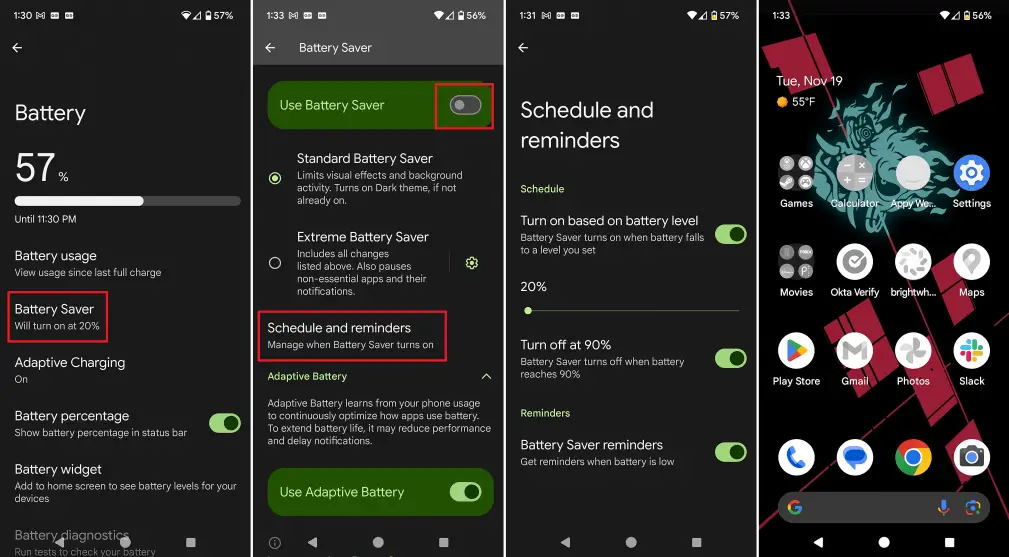
Modern Android devices include Adaptive Battery, which uses AI to learn which apps you use most and limits background activity for apps you rarely open. iPhones have Optimized Battery Charging, which learns your charging habits to reduce battery wear.
How to enable:
- Android: Settings → Battery → Adaptive Battery → Turn On
- iOS: Settings → Battery → Battery Health & Charging → Optimized Battery Charging
2. Use Power-Saving Modes Strategically
Most smartphones include multiple power-saving modes:
- Medium/Normal Power Saver: Limits background activity and reduces performance slightly.
- Ultra/Extreme Power Saver: Disables non-essential features like animations, background sync, and high-performance mode.
Customizing which features are restricted can save battery without sacrificing usability.
3. Restrict Background App Refresh
Apps like Facebook, Instagram, or Gmail often refresh in the background, consuming battery. You can manually restrict background activity:
- Android: Settings → Apps → [Select App] → Battery → Background Restriction
- iOS: Settings → General → Background App Refresh → Toggle Off
4. Manage Location Services
GPS is a major battery drain. Use “While Using App” for location permissions instead of “Always”. Additionally:
- Disable Wi-Fi and Bluetooth scanning when not needed.
- Turn off location history tracking.
5. Control Notifications
Every notification wakes your screen and can use energy. Turn off non-essential notifications:
- Android: Settings → Apps & Notifications → Notifications
- iOS: Settings → Notifications → Customize per app
6. Advanced Display Tweaks
- Refresh Rate: High-refresh-rate displays (120Hz, 144Hz) consume more battery. Use 60Hz when high refresh isn’t needed.
- Dark Mode: AMOLED screens save battery in dark mode because black pixels don’t draw power.
- Always-On Display: Consider turning it off unless necessary.
Managing Apps and System Resources
Apps are often the hidden culprit behind fast battery drain. Smart management can make a big difference.
1. Identify Battery-Hungry Apps
Both Android and iOS allow you to see which apps consume the most power:
- Android: Settings → Battery → Battery Usage
- iOS: Settings → Battery → Battery Usage by App
Uninstall or limit apps that are unnecessarily draining power.
2. Force-Stop or Restrict Apps Intelligently
Instead of closing every app, focus on apps that use background processing like social media, navigation, and streaming apps.
3. Manage App Permissions
Some apps constantly use location, camera, or microphone. Restrict permissions to only when necessary.
4. Use Third-Party Battery Monitoring Apps Carefully
Apps like GSam Battery Monitor (Android) provide insights, but avoid battery savers that claim to “boost” battery; they often use more resources.
Charging Habits for Maximum Battery Life
How you charge your phone affects long-term battery health.
1. Partial Charging Strategy
Charging from 20% to 80% is ideal for battery longevity. Frequent full charges can wear out batteries faster.
2. Fast Charging vs. Slow Charging
Fast charging generates heat, which can degrade batteries over time. Use slower charging overnight if possible.
3. Overnight Charging Tips
Modern phones manage overcharging, but to reduce heat:
- Avoid heavy use while charging.
- Keep the phone on a flat, cool surface.
4. Avoid Extreme Temperatures
Heat and cold both degrade batteries. Never leave your phone in a hot car or in freezing environments.
Hardware and Accessories Tips
Battery longevity isn’t just about software and habits; hardware choices matter too.
1. Use Cases Wisely
Thick or insulating cases can trap heat during charging or heavy usage. Consider using a case that allows airflow if battery health is a priority.
2. Choose the Right Charger
Always use official or certified chargers. Cheap, unregulated chargers can overheat the battery.
3. Replace Batteries When Necessary
If your phone’s battery health drops below 80%, consider replacing it. Most manufacturers offer replacement programs.
Emerging Technologies and Features
Smartphones are evolving to help users maximize battery life automatically.
1. AI-Driven Battery Management
Some phones now use AI to predict your usage patterns, automatically adjusting background processes, screen brightness, and CPU performance to save energy.
2. Smart Charging Schedules
Some devices allow you to schedule charging based on your daily habits to reduce battery wear.
3. Future Battery Innovations
Next-gen batteries like solid-state batteries promise higher capacity, faster charging, and longer lifespans. While not mainstream yet, these developments indicate a future where battery anxiety could be minimal.
Conclusion
Learning how to extend your phone’s battery life is a combination of smart habits, advanced settings, and proper charging techniques. Start with basic adjustments like screen brightness, Wi-Fi usage, and vibration settings. Then move on to advanced strategies like adaptive battery management, background app restrictions, and display tweaks. Combine these with smart charging habits, quality accessories, and awareness of battery health, and your smartphone will last longer, perform better, and stay reliable when you need it most.
By implementing even a few of these strategies, you can dramatically improve battery life, reduce stress about running out of power, and get the most out of your device.